
预制服务
容器化部署 ComfyUI-ReActor 并通过 api 调用
ComfyUI-ReActor 是一个用于 ComfyUI 的快速简单的换脸扩展节点。它利用多个模型组合来实现人脸检测、人脸交换和人脸修复。本文介绍了 ComfyUI-ReActor 的快速部署与 简单的 api 调用。
ComfyUI-ReActor 是一个用于 ComfyUI 的快速简单的换脸扩展节点。它利用多个模型组合来实现人脸检测、人脸交换和人脸修复。本文介绍了 ComfyUI-ReActor 的快速部署与 简单的 api 调用。
部署流程
访问共绩算力控制台 https://console.suanli.cn/serverless/idc
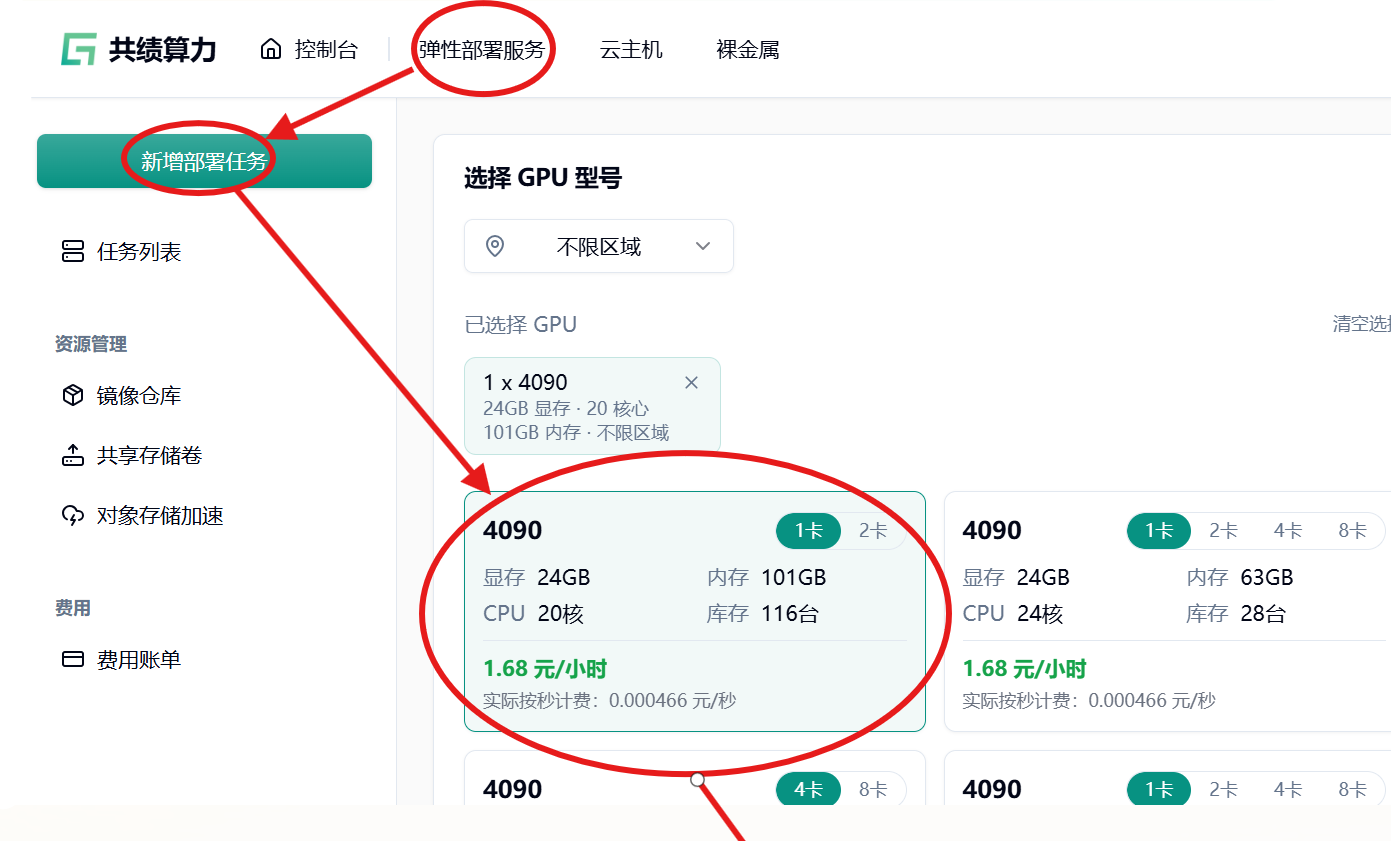
依次访问【弹性部署服务】-> 【新增部署任务】 -> 【选择 GPU 型号】-> 下拉至【服务配置】页面
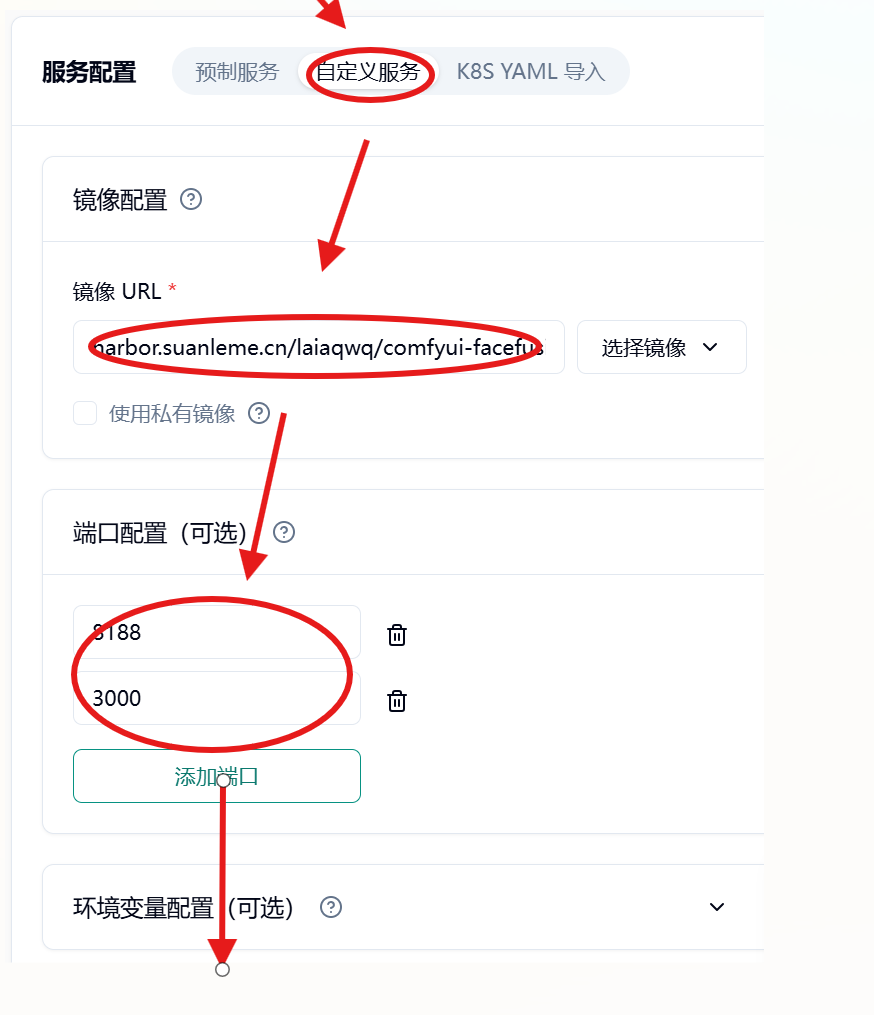
在【服务配置】选项选择【自定义服务】-> 【镜像 url】->
harbor.suanleme.cn/laiaqwq/comfyui-facefusio-api:0.1.7
【端口配置】 ->
7860
3000
接着下拉【部署服务】
等待服务部署完毕,需要 5-30 分钟 (镜像拉取 + 启动)。
验证部署
部署后平台会自动暴露出服务
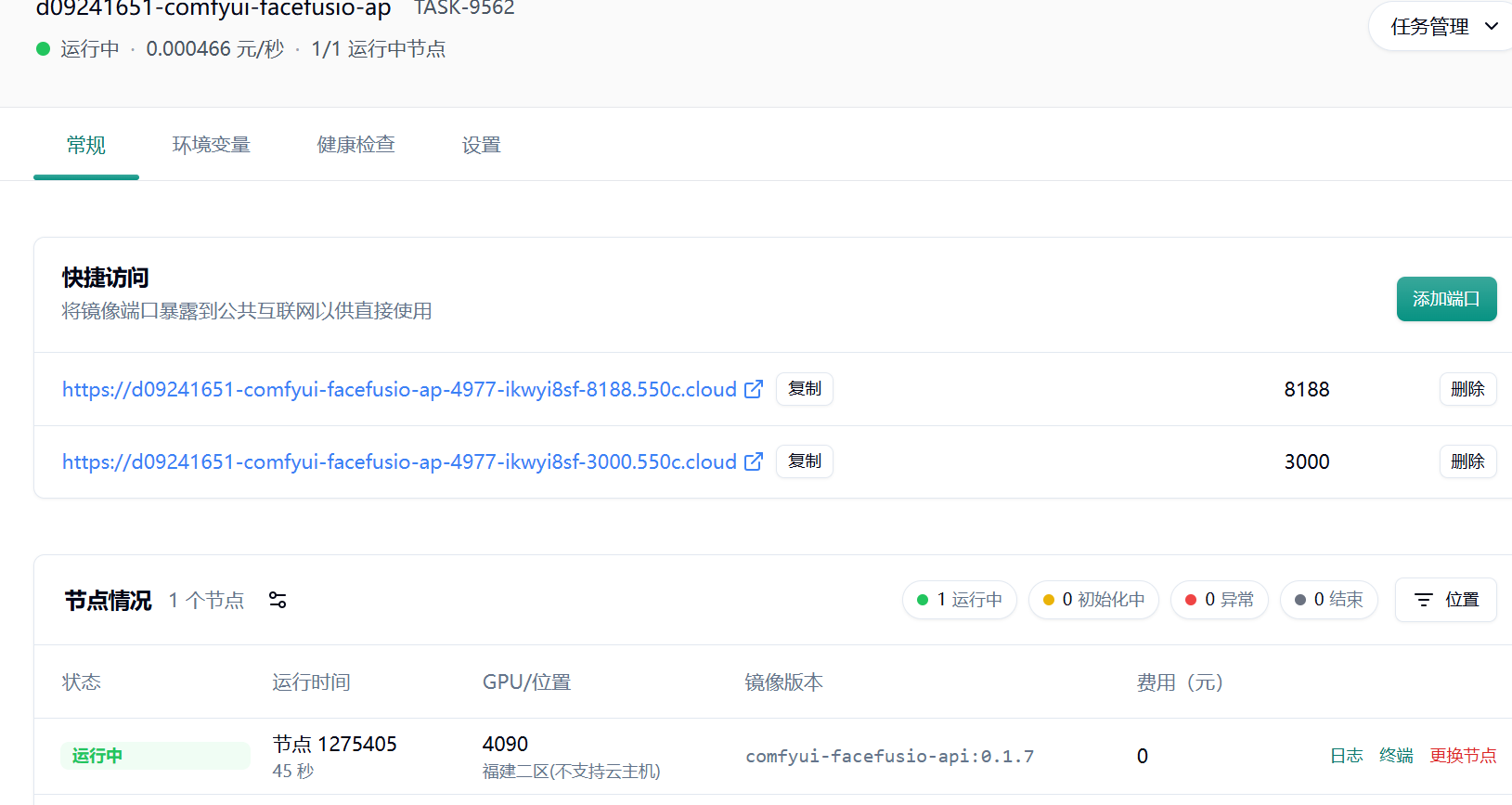
这时我们需要记住暴露出的服务 URL (需要根据自己的实际替换)
https://d09241651-comfyui-facefusio-ap-4977-ikwyi8sf-8188.550c.cloud
https://d09241651-comfyui-facefusio-ap-4977-ikwyi8sf-3000.550c.cloud
通过 api 调用服务:
Step 1: 编码图片
我们共需要两张图片
一张为脸部图片:face_image
一张为代替换的图片:body_image
我们将要从 face_image 中提取脸部,然后将提取的脸部融合入 body_image 中
我们先将两张图片都转化为 base64 编码然后放入下述结构中中
body_image = {
  "data": "图片的 base64 编码"
}
face_image = {
"data": "图片的 base64 编码"
}Step 2: 合并成 comfyui 工作流
我们将 body_image 与 face_image 添加到下面的 worlflow_json
worlflow_json = {
  "1": {
    "inputs": {
      "enabled": True,
      "swap_model": "inswapper_128.onnx",
      "facedetection": "retinaface_resnet50",
      "face_restore_model": "codeformer-v0.1.0.pth",
      "face_restore_visibility": 1,
      "codeformer_weight": 0.5,
      "input_image": [
        "2",
        0
      ],
      "face_model": [
        "2",
        1
      ],
      "face_boost": [
        "3",
        0
      ]
    },
    "class_type": "ReActorFaceSwapOpt",
    "_meta": {
      "title": "ReActor 🌌 Fast Face Swap [OPTIONS]"
    }
  },
  "2": {
    "inputs": {
      "faceswap_weight": "75%",
      "input_image": [
        "10",
        0
      ],
      "source_image": [
        "12",
        0
      ]
    },
    "class_type": "ReActorSetWeight",
    "_meta": {
      "title": "ReActor 🌌 Set Face Swap Weight"
    }
  },
  "3": {
    "inputs": {
      "enabled": True,
      "boost_model": "none",
      "interpolation": "Bicubic",
      "visibility": 1,
      "codeformer_weight": 0.5,
      "restore_with_main_after": True
    },
    "class_type": "ReActorFaceBoost",
    "_meta": {
      "title": "ReActor 🌌 Face Booster"
    }
  },
  "6": {
    "inputs": {
      "bbox_model_name": "bbox/face_yolov8m.pt",
      "bbox_threshold": 0.5,
      "bbox_dilation": 10,
      "bbox_crop_factor": 3,
      "bbox_drop_size": 10,
      "sam_model_name": "sam_vit_b_01ec64.pth",
      "sam_dilation": 0,
      "sam_threshold": 0.93,
      "bbox_expansion": 0,
      "mask_hint_threshold": 0.7,
      "mask_hint_use_negative": "False",
      "morphology_operation": "dilate",
      "morphology_distance": 0,
      "blur_radius": 9,
      "sigma_factor": 1,
      "image": [
        "10",
        0
      ],
      "swapped_image": [
        "1",
        0
      ]
    },
    "class_type": "ReActorMaskHelper",
    "_meta": {
      "title": "ReActor 🌌 Masking Helper"
    }
  },
  "8": {
    "inputs": {
      "images": [
        "6",
        2
      ]
    },
    "class_type": "PreviewImage",
    "_meta": {
      "title": "Preview Image"
    }
  },
  "9": {
    "inputs": {
      "images": [
        "6",
        3
      ]
    },
    "class_type": "PreviewImage",
    "_meta": {
      "title": "Preview Image"
    }
  },
  "10": {
    "inputs": body_image,
    "class_type": "LoadImageFromBase64",
    "_meta": {
      "title": "body Image From Base64"
    }
  },
  "11": {
    "inputs": {
      "filename_prefix": "face",
      "images": [
        "6",
        0
      ]
    },
    "class_type": "SaveImage",
    "_meta": {
      "title": "Save Image"
    }
  },
  "12": {
    "inputs": face_image,
    "class_type": "LoadImageFromBase64",
    "_meta": {
      "title": "face Image From Base64"
    }
  }
}
Step 3: 发送请求
提示通过 POST 提交到服务器,URL 为
https://d09241651-comfyui-facefusio-ap-4977-ikwyi8sf-3000.550c.cloud/prompt (上述生成的 3000 端口的转发 url)
{
  "prompt": worlflow_json,
}
Step 4: 解析返回
请求发送后得到响应:
{
  "id": "string",
  "prompt": {
    "additionalProp1": {
      "inputs": "string",
      "class_type": "string",
      "_meta": "string"
    },
    "additionalProp2": {
      "inputs": "string",
      "class_type": "string",
      "_meta": "string"
    },
    "additionalProp3": {
      "inputs": "string",
      "class_type": "string",
      "_meta": "string"
    }
  },
  "images": [
    "string"
  ],
  "filenames": [
    "string"
  ],
  "status": "ok"
}
其中的 images 即包含返回图片的 Base64 编码。